
The Privacy Settings Worth Changing on Every Device You Own
By Roy Kaden Roi on July 3, 2026
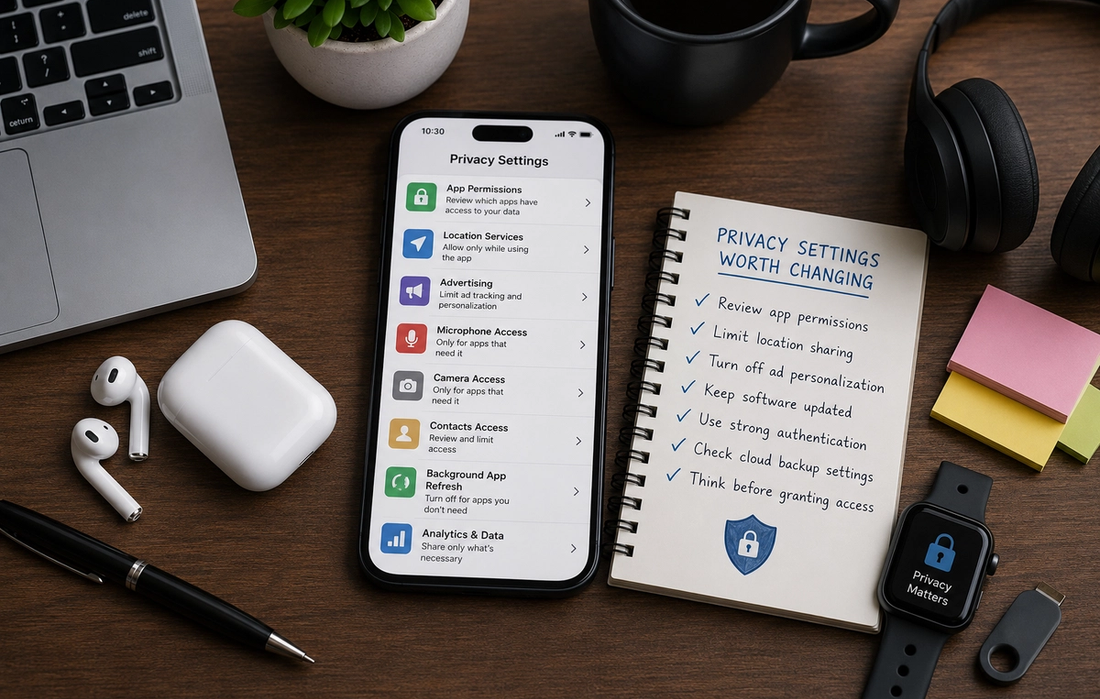
Every smartphone, tablet, laptop, and smart device comes with privacy settings.
The problem is that most of us never look at them. We unpack a new device, sign in, accept the default options, and start using it without thinking much about what information we’re sharing. While default settings are designed to make devices easy to use, they’re not always designed to maximize your privacy.
That doesn’t mean your devices are unsafe.
It simply means that a few small adjustments can give you more control over your personal information without changing the way you use your technology every day.
You don’t need to be a cybersecurity expert to improve your privacy. Spending just a few minutes reviewing a handful of settings can make a meaningful difference.
Review your app permissions
One of the easiest places to start is with app permissions.
Many apps request access to your location, camera, microphone, contacts, photos, calendar, or files when you first install them. Sometimes these permissions are necessary for the app to work properly. Other times, they’re far more generous than they need to be.
Take a few minutes to review which permissions each app has.
Ask yourself a simple question: Does this app genuinely need access to this information?
For example, a navigation app clearly needs your location, but a simple flashlight app probably doesn’t. Likewise, a video-calling app needs your microphone, while many games do not.
Removing unnecessary permissions gives you greater control over your personal information without affecting most apps.
Limit location sharing
Location services are incredibly useful.
They help with maps, weather forecasts, finding nearby restaurants, and many other everyday tasks. However, not every app needs to know where you are all the time.
Many devices allow you to choose between different levels of location access. Instead of granting permanent access, you can often allow an app to use your location only while you’re actively using it.
This simple adjustment helps reduce unnecessary location tracking while still allowing useful features to work when you need them.
It’s a small change that can significantly improve your privacy.
Turn off advertising personalization if you prefer
Many companies use information about your activity to personalize advertisements.
This doesn’t necessarily mean someone is reading your private messages, but it can mean that your browsing habits, searches, and app usage contribute to the ads you see online.
Most operating systems allow you to limit or reset advertising identifiers and reduce personalized advertising.
Doing so won’t eliminate advertisements completely, but it can reduce how much your activity is used to tailor them.
If you’d rather see more general ads than highly personalized ones, this setting is worth reviewing.
Keep your software updated
Privacy isn’t only about settings.
It’s also about security.
Software updates often include important fixes for newly discovered security vulnerabilities. Delaying updates for months can leave devices exposed to problems that have already been resolved.
Enabling automatic updates where possible helps ensure your phone, tablet, laptop, and apps receive the latest security improvements without requiring constant attention.
Keeping software current remains one of the simplest and most effective ways to protect your information.
Use strong authentication
Passwords remain an important part of online security, but they work best when combined with additional protection.
Where available, enable biometric authentication such as fingerprint or facial recognition, along with two-factor authentication for important accounts like email, banking, and cloud storage.
These extra layers of security make it much more difficult for someone else to access your information, even if they somehow learn your password.
Strong authentication protects both your privacy and your digital identity.
Check cloud backup settings
Cloud services make it easy to keep photos, documents, and other files synchronized across devices.
However, it’s worth understanding exactly what is being backed up.
Take a moment to review your cloud settings and decide whether everything currently being stored online actually needs to be there. Some people prefer backing up only essential information, while others are comfortable syncing everything.
There isn’t one correct choice.
The important thing is making an informed decision rather than relying entirely on the default settings.
Think before granting access
One of the best privacy habits isn’t a setting at all.
It’s simply slowing down before pressing “Allow.”
Whenever a new app requests access to your camera, contacts, location, or microphone, take a moment to consider whether that permission makes sense. If you’re unsure, many devices allow you to deny access initially and grant it later if necessary.
Most apps continue working perfectly well with fewer permissions than they originally request.
A few extra seconds of attention can prevent unnecessary data sharing for years.
Privacy is about control, not secrecy
Some people assume privacy only matters if they have something to hide.
In reality, privacy is about having control over your own information.
Just as you wouldn’t hand copies of your house keys to everyone you meet, there’s no reason to give every app unlimited access to your personal data.
Protecting your privacy doesn’t require disconnecting from technology.
It simply means deciding who has access to your information and for what purpose.
That’s a choice everyone deserves to make.
Small changes can make a big difference
Improving your digital privacy doesn’t require buying new devices or becoming a technology expert.
Reviewing app permissions, limiting location sharing, keeping your software updated, using strong authentication, and paying attention to what information you share are all simple habits that gradually strengthen your privacy over time.
None of these changes are complicated.
Together, however, they help ensure your devices work for you without collecting more information than necessary.
In the end, good digital privacy isn’t about fear.
It’s about making thoughtful choices, staying informed, and remembering that a few minutes spent adjusting your settings today can protect your information for years to come.






MORE IN TRENDING
How to Find Your Personal Style in 6 Steps
Sam Bitton .
How to Spot a Beauty Product That’s Actually Worth the Hype
Adi Liad .
The Privacy Settings Worth Changing on Every Device You Own
Roy Kaden Roi .

How to Spend Less Time on Your Phone Without Going Off-Grid
Roy Kaden Roi .

The Digital Habits of People Who Seem Calm Online
Jade Josef .